Lab Link: https://www.skills.google/course_templates/741/labs/592448
Challenge scenario
Pet Theory, a veterinary practice, is eager to adopt serverless architecture for modernizing their current systems.
In this challenge lab, as a member of the development team, your assignment is to transition a specific service to a serverless framework. It's crucial to follow the detailed instructions given to accomplish this task successfully.
Architecture overview
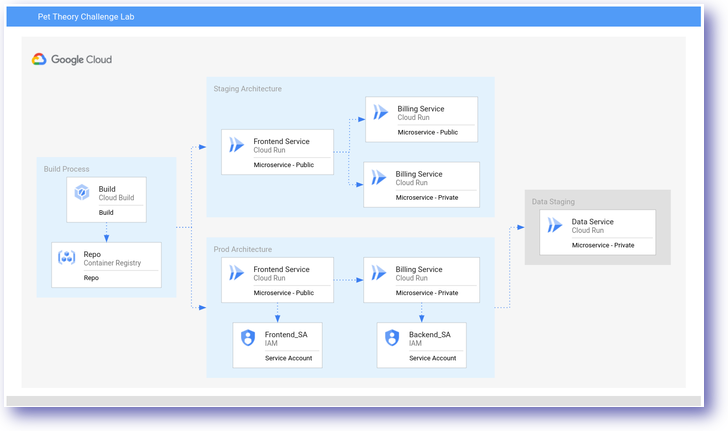
For this project, Pet Theory has selected their current monolithic Billing application to undergo transformation into a serverless model.
Throughout this lab, your responsibility is to execute this architectural upgrade, ensuring a seamless transition to the serverless design.
Provision the lab environment
1. Open cloud shell.
2. Set preparation variables.
# 1. Set project ID as a variable
export PROJECT_ID=$(gcloud config get-value project)

# 2. Set assigned region (REPLACE "us-central1" WITH THE REGION ASSIGNED TO YOU IN THE LAB INSTRUCTIONS)
export REGION="us-central1"

# 3. Configure gcloud defaults
gcloud config set run/region $REGION
gcloud config set run/platform managed

# 4. Clone the lab repository
git clone https://github.com/rosera/pet-theory.git
cd pet-theory/lab07
Task 1. Enable a public service
Build an image for "Billing Service" and deploy it, so that the service can access without authenticated.
1. Run the command. Check the billing service name in the lab and check on the deploy command that correct on deploy command public-billing-service.
# Navigate to the unit-api folder
cd ~/pet-theory/lab07/unit-api-billing

# Build the image via Cloud Build
gcloud builds submit --tag gcr.io/$PROJECT_ID/billing-staging-api:0.1

# Deploy it to Cloud Run as unauthenticated
gcloud run deploy public-billing-service \
  --image gcr.io/$PROJECT_ID/billing-staging-api:0.1 \
  --allow-unauthenticated
Task 2. Deploy a frontend service
Build and deploy the frontend application. This web app will be public access.
1. Run the command. Also check the frontend service name on the lab and on the command frontend-staging-service.
# Navigate to the staging frontend folder
cd ~/pet-theory/lab07/staging-frontend-billing

# Build the image
gcloud builds submit --tag gcr.io/$PROJECT_ID/frontend-staging:0.1

# Deploy it to Cloud Run
gcloud run deploy frontend-staging-service \
  --image gcr.io/$PROJECT_ID/frontend-staging:0.1 \
  --allow-unauthenticated
Task 3. Deploy a private service
The lab require to delete the old public billing service and redeploy with new version (0.2), this version also need an authenticated access.
1. Run the command. Also don't forgot to check the private-billing-service name on the command that match the lab needed private-billing-service.
# Navigate to the staging api folder
cd ~/pet-theory/lab07/staging-api-billing

# Delete the old public billing service
gcloud run services delete public-billing-service --quiet

# Build the new 0.2 image
gcloud builds submit --tag gcr.io/$PROJECT_ID/billing-staging-api:0.2

# Deploy it requiring authentication (--no-allow-unauthenticated)
gcloud run deploy private-billing-service \
  --image gcr.io/$PROJECT_ID/billing-staging-api:0.2 \
  --no-allow-unauthenticated
Task 4. Create a billing service account
Create a Service Account that the new Billing Service can run.
1. Run the command. Check the service account on the command that match the lab needed billing-service-sa.
# Create the Billing Service Account
gcloud iam service-accounts create billing-service-sa --display-name "Billing Service Account Cloud Run"
Task 5. Deploy the billing service
Deploy the production billing service using service account that created from previous task.
1. Run the command. Check the billing production service name and service account on the command that match the lab instruction (billing-prod-service and billing-service-sa).
# Navigate to the prod api folder
cd ~/pet-theory/lab07/prod-api-billing

# Build the production image
gcloud builds submit --tag gcr.io/$PROJECT_ID/billing-prod-api:0.1

# Deploy the production service attached to the new Service Account
gcloud run deploy billing-prod-service \
  --image gcr.io/$PROJECT_ID/billing-prod-api:0.1 \
  --no-allow-unauthenticated \
  --service-account=billing-service-sa@$PROJECT_ID.iam.gserviceaccount.com
Task 6. Frontend service account
Create a service account for the frontend and grant the permission for accessing the secure backend billing service.
1. Run the command. Check the frontend service account frontend-service-sa, billing production service billing-prod-service, and frontend service account name frontend-service-sa on permission granted that match the lab needed.
# Create the Frontend Service Account
gcloud iam service-accounts create frontend-service-sa --display-name "Frontend Service Account Cloud Run Invoker"

# Grant the Frontend SA permission to invoke the Billing Prod Service
gcloud run services add-iam-policy-binding billing-prod-service \
  --member=serviceAccount:frontend-service-sa@$PROJECT_ID.iam.gserviceaccount.com \
  --role=roles/run.invoker
Task 7. Redeploy the frontend service
Deploy the production version of the frontend, and attach the new service account. It' will be public (user can access the website), The web frontend app will be accessing private secure backend using service account.
1. Run the command. Again also don't forgot to check the frontend service name (frontend-prod-service) and frontend service account name (frontend-service-sa) on the command that match the lab needed.
# Navigate to the prod frontend folder
cd ~/pet-theory/lab07/prod-frontend-billing

# Build the production frontend image
gcloud builds submit --tag gcr.io/$PROJECT_ID/frontend-prod:0.1

# Deploy the frontend service attached to its Service Account
gcloud run deploy frontend-prod-service \
  --image gcr.io/$PROJECT_ID/frontend-prod:0.1 \
  --allow-unauthenticated \
  --service-account=frontend-service-sa@$PROJECT_ID.iam.gserviceaccount.com
Congratulations. Done the lab.